Multi-Board Net Classes
The container holds the canonical net classes for a multi-board project. On container save, those classes propagate physically into every sub-project's .kicad_pro. Each sub-project keeps the result in its own settings and uses it for ERC, DRC, routing, and rendering.
When replication happens
Replication runs on container save:
- From the desktop: when you click OK on Schematic Setup → Net Classes (container mode),
MultiBoardPropagateNetSettingsruns. - From the agent / Python:
mbs_setupandset_netclasspersist the container, then run the propagator before returning.
Disk-only sub-projects (not currently open) are loaded ephemerally, updated, and unloaded after.
What replicates
All net-class fields except priority:
- Clearance, track width, via diameter / drill, microvia diameter / drill
- Differential pair width / gap / via gap
- Wire width, bus width, line style
- Tuning profile
- PCB color, schematic color
Priority is per-sub-project. Each board's net class grid keeps its own row order; the container's priority is never propagated. This avoids spurious conflicts when either board's grid order changes.
The Status column
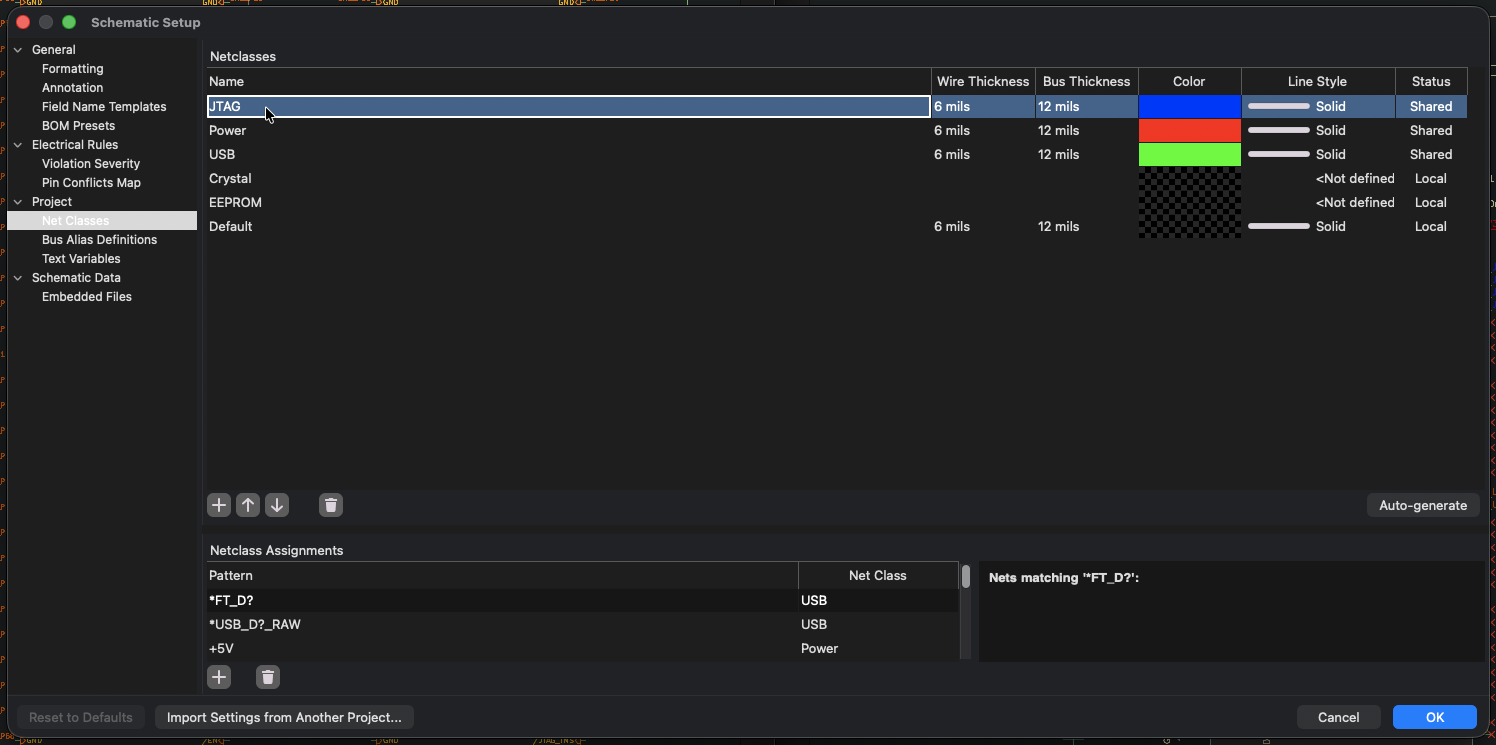
The Status column appears on Schematic Setup → Net Classes (and PCB Setup → Net Classes). Its values depend on whether you're viewing from a sub-project or from the container.
On a sub-project
| Status | Meaning |
|---|---|
| Shared | Class name and all replicated fields match the container's copy |
| Local | Class exists only on this sub-project (no container match) |
| Conflict | Class name exists on both, but at least one field differs |
On the container (MBSCH)
Opening Schematic Setup from the MBSCH shows an aggregated view across the container and every sub-project. Status values:
| Status | Meaning |
|---|---|
| Source | The container defines this class and no sub-project has a same-named class |
| Shared | Every sub-project that has this class matches the container |
| Conflict | At least one sub-project has a same-named class with diverging fields |
| Only on <board> | A sub-project defines this class but the container doesn't |
Only on <board> rows are read-only on the container view. The container is the canonical source, so sub-project-only classes are surfaced for visibility but can't be edited here. Container rows remain editable.
Conflict resolution
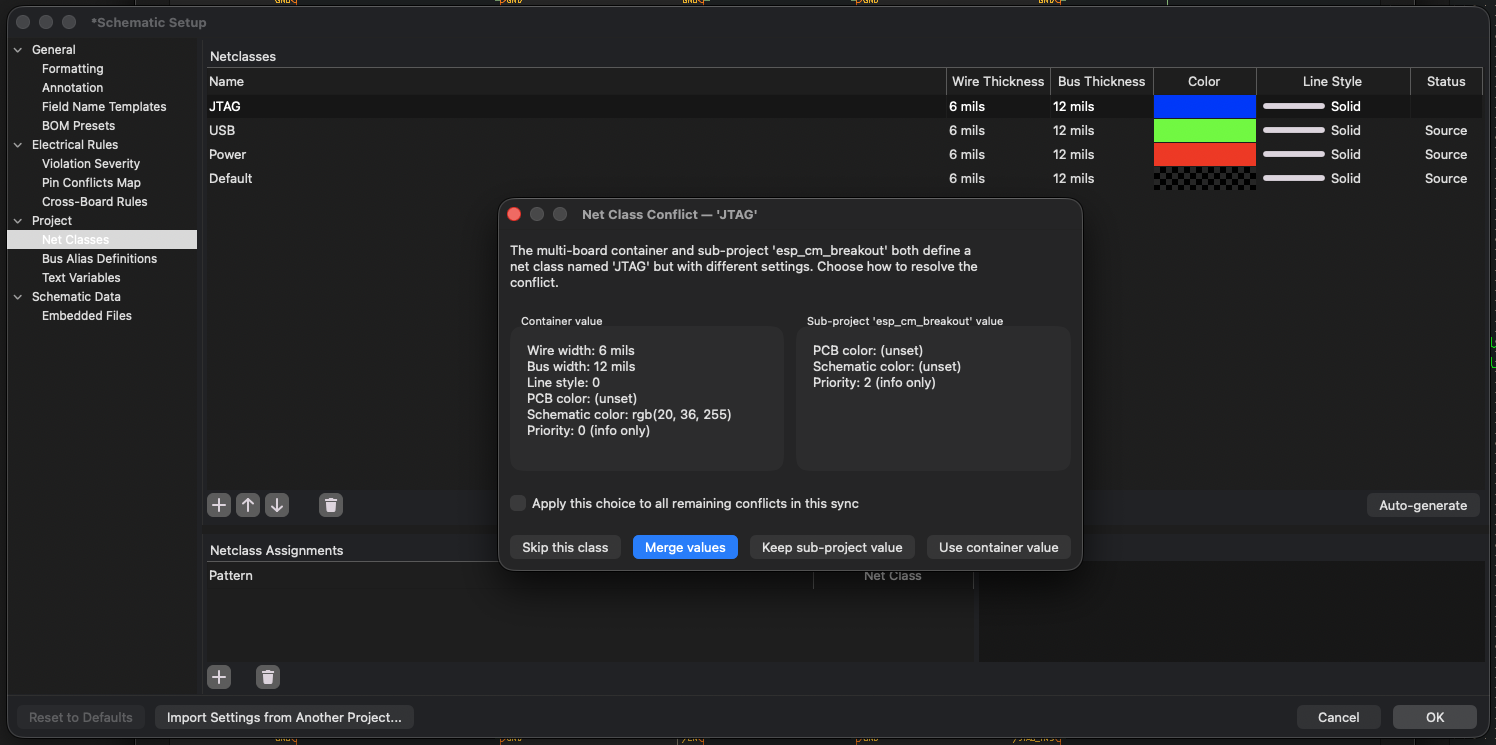
When propagation finds a conflict (same name, different fields), the Net Class Conflict dialog opens for each affected class. Four options per conflict:
- Use container value: overwrite the sub-project's class with the container's
- Keep sub-project value: leave the sub-project unchanged
- Merge: union the field sets. Only available when no field has a different value on each side (e.g. one side specifies clearance, the other specifies track width, neither contradicts). Disabled with a tooltip when the values truly conflict.
- Skip this class: do nothing on this sub-project, leave the existing state
Each option has an Apply to all remaining conflicts checkbox to bulk-resolve. Sticky Merge only applies to subsequent conflicts that are also mergeable; non-mergeable conflicts re-prompt.
Headless callers (agent, Python) don't see the dialog. The handler resolves conflicts silently using "Use container value". The Merge option is desktop-only; headless mutations always go through the binary use-or-keep decision. The response counters report how many classes were added, overwritten, kept, or skipped.
The Default class
Every project has a Default net class. It always exists and can be modified, but cannot be created or deleted. The agent and Python APIs return an error if you try to delete it; the desktop UI hides those actions for the Default row.
From the agent and Python
- Agent:
mbs_setupwithnet_classespayload reads or mutates the container's classes. - Python:
get_netclass_report,set_netclass,delete_netclassonMultiBoardOperations.